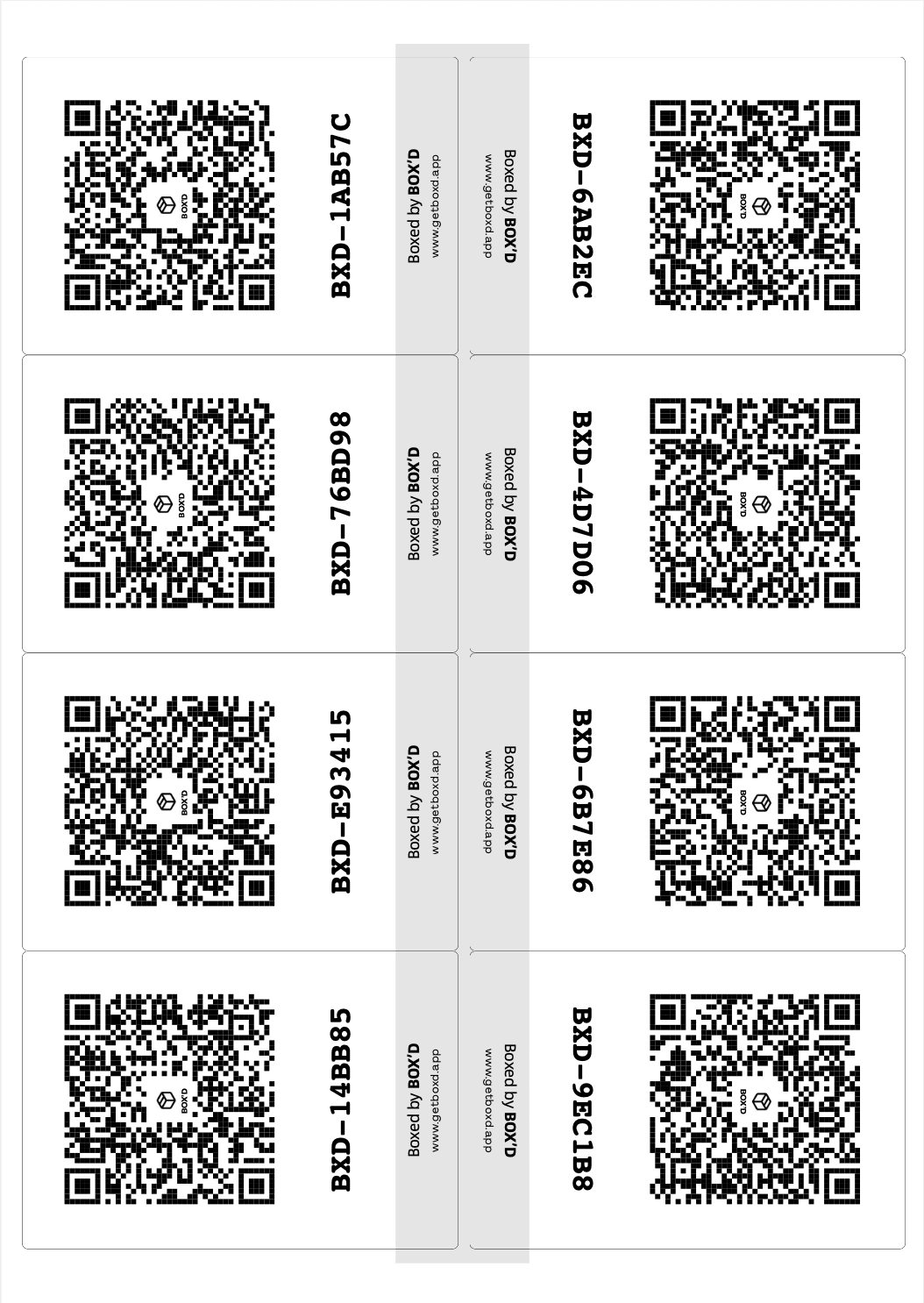
How Box’d labels work

They fit standard Avery sheets so you can grab labels at any office shop. They're not tied to an account. Print from the app when you need more (we're working on bulk). And you need our labels for Flashlight Find.

No fuss to print

Our labels fit standard Avery templates if you want peel-and-stick, but you can also print on plain paper, cut them up, and stick them on with clear packing tape. They aren't attached to an account, so you can print a stack and scan them into any account when you're ready. Print from the app whenever you need more; you'll get a new set each time. We're working on bulk printing. For now it's one print at a time. You need our labels if you want Flashlight Find (point your phone at the room and the right box lights up).

See the full Box'd story · Moving? See the moving guide · Professional organisers

What you need to know

Standard sheets, no account lock-in. Our labels unlock Flashlight Find.

Avery or plain paper

Our labels fit Avery J8165 (and similar) sheets. Grab them at Officeworks, Amazon, or any office supplier. Or just print on plain paper, cut them up, and stick them on with clear packing tape. You don't need a special printer or fancy paper.

Not tied to an account

Labels aren't linked to an account until you scan them. Print a stack at home, take them to the job or the unit, then stick them on and scan them into your (or your client's) account when you're ready.

Print from the app when you need more

Every time you print labels from the app, you get a new set. We're working on bulk printing; for now it's one print at a time.

Flashlight Find needs our labels

Flashlight Find only works with our QR labels. Point your phone at the room and the right box lights up. If you use numbers instead of labels, you still get voice, search, and photos. You just won't get the scan-to-find bit.

Frequently Asked Questions

Everything you need to know about taming the "Misc" box madness.

How do I cancel my subscription?

No stress. You can manage your subscription directly through your Apple ID settings. Just go to Settings > [Your Name] > Subscriptions on your iPhone to cancel or change your plan at any time.

What kind of labels should I use?

Box’d works with any standard A4 sticker or label sheet. Our labels are designed to fit Avery J8165 labels, which you can pick up at Officeworks or on Amazon. If you’re in a hurry, full-sheet adhesive labels or even plain paper and a bit of packing tape work just as well. Just print them out and cut them to size!

Do I have to print labels?

Nope. You can grab a sharpie and write a number on each box, then enter that number in the app and pack as usual. You’ll get voice inventory, searchable lists, and photos. What you won’t get with numbers-only is Flashlight Search (the scan-your-room-to-find-the-box feature), since that needs a QR code to scan. If you want that magic, print the labels.

Where is the best spot to stick the labels?

For the best results, especially in dark garages or crowded storage units, print two copies of your labels and place matching stickers on two adjacent sides of the box. That way, no matter how the movers stack them or how high you pile them in the shed, you’ll always have a code ready to scan.

Is Box’d just for moving house?

Moving house is where we started, but Box’d is for anyone who stores things in containers. Good for renovations, collectors (no more opening vintage toy boxes!), or tradies who need to find a specific tool in a van full of crates. If it’s in a tub, Box’d can find it.

Can I use this for my small business?

Absolutely. If you’re running a "garage warehouse" or managing archives, Box’d gives you a digital inventory without the enterprise price tag. The visual search means you can verify stock levels without unstacking the whole pallet.

Why do you need access to my camera and mic?

We use the camera to scan your QR labels and take "X-Ray" photos of what’s inside. We use the microphone for our voice-to-text feature, so you can just shout "Spanners and drill bits" while your hands are full of tools and let the app do the typing for you.

Does Box’d work without internet?

Right now, Box’d needs an internet connection to keep your inventory in sync. We know garages, sheds, and storage units don’t always have reliable signal. Offline mode is a priority and we’re working on it ASAP.

Is there an Android version?

Not just yet, but it's coming soon! We're currently iOS only, but we're working hard to bring Box'd to Android. If you'd like to be notified when it launches, shoot us an email.

Who can see my data?

Only you. We take privacy seriously. We don't sell your data, and we don't look at your boxes. Our support team only accesses your database if you specifically ask for help with a technical issue.

Can I share my inventory with movers or family?

Yes, our "Partner Share" feature has just been released. Look out for the share button in the app to give it a go. Let us know what you think and if it suits your situation, we're always looking for ways to improve.

I'm a Professional Organiser. How do I use this with clients?

We have a lot of POs using Box'd! The labels aren't linked to an account until they're scanned. This means you can print a bulk stack of labels at home, take them to a client's house, and scan them into their account. You don't need to print labels on-site. See the full workflow for professional organisers.

Is it free?

You can pack your first 5 boxes for free, with no account required. If you need more, you can upgrade to an unlimited subscription for a small monthly or yearly fee. This supports the ongoing development of the app (servers, designs, and coffee!).

I have more questions, how can I get help?

If you're stuck or have a brilliant idea for a new feature, I’d love to hear from you. You can reach out directly via support@getboxd.app. We’re a small team (okay, it’s just me!), but I’ll get back to you as soon as I can.

Get the app

5 boxes free. Print your first labels from the app, then upgrade when you need more.

Download on the App Store
Get it on Google Play
Coming Soon

Box'd — Because "Misc" is not a location.