Choosing an app8 min readBy Box’d
Best moving box apps: prices, features and labels
Seven ways to keep track of what’s inside. Compare the cost, the setup and how you’ll find things when the boxes arrive.

The short version
For marker-first packing on iPhone, we recommend Box’d. Write a number, record what’s inside and search later. Other options suit Android households, offline storage, business inventory or a DIY list. Start with the job you need the app to do.
In this guide
We make Box’d. This comparison uses official product pages and App Store listings checked on . It isn’t a hands-on speed test. Sources appear beside each app, and we flag details we couldn’t confirm.
Compare what each app does on packing day
A box number connects the cardboard to its contents list. QR labels add scanning, but they aren’t the only way to make that connection.
On a small screen, scroll the table sideways.
| App | Box labels | Contents | Pack together |
|---|---|---|---|
| Box’d | Enter the number you write on the box. QR labels are optional. | Voice-to-list, text, photos and search. | Every paid plan can share. Invited collaborators join free. |
| BoxBuddy | Automatic room-based numbers and printable QR labels. | Voice keywords, text, photos and search. | Family plan owner; invited members join free. |
| MOVINGBOXES | Named boxes. Printable labels with or without QR codes. | Text, photos, search, voice commands and image recognition. | Shared projects; owner Premium extends most limits to collaborators. |
| Boxes | Box numbering, custom labels, QR/barcodes and NFC tags. | Text, photos, search, custom attributes and offline use. | Team invitations with roles. Check the plan’s allowances. |
| Moving Organizer | Named box records with locations. | Text, photos and search. | Pro uses manual Dropbox backup/restore, not live collaboration. |
| Sortly | Custom folders, QR/barcode scanning and paid label creation. | Item photos, inventory lists, custom fields and search. | Paid plans include multiple user licences. |
| Google Sheets / Apple Notes | Write numbers and maintain matching rows or notes yourself. | Text, images and search. Phone keyboard dictation may help with entry. | Shared editing. Notes collaboration uses iCloud accounts. |
We haven’t verified every competitor’s printer-free setup. A printed label feature doesn’t mean printing is compulsory. Likewise, keyboard dictation isn’t the same as an app turning speech into a contents list.
Check the price you’ll actually pay
Prices below are in US dollars, checked on 10 November 2026. Regional prices, promotions and plan limits can change. Follow the sources in each app’s section before buying.
On a small screen, scroll the table sideways.
| App | Free option | Paid option | Platform |
|---|---|---|---|
| Box’d | 5 boxes. No account needed to start. | $19.99 non-renewing three-month pass; $7.99/month; $39.99/year. | iPhone |
| BoxBuddy | 10 boxes, 2 photos per box. | $19.99/year Single; $29.99/year Family. | iPhone/iPad; web printing |
| MOVINGBOXES | Free tier. Check current limits in the app. | Premium $3.99/month or $24.99/year. Pro Bundle $12.99 one-time with fewer features. | iPhone/iPad, Android, web |
| Boxes | Free download with limited capacity; check in-app allowances. | App Store lists Lifetime Unlock $34.99 and Lifetime Unlock Pro $59.99, plus other tiers. | iPhone/iPad |
| Moving Organizer | Lite: one move, unlimited boxes/items, with ads. | Pro $0.99 one-time on the US App Store. | iPhone/iPad, Android; Android price may differ |
| Sortly | 100 unique items, 1 user. Items are not the same as boxes. | Advanced $49/month, or an introductory annual offer of $288 upfront. Annual renewal pricing differs. | iPhone/iPad, Android, web |
| Google Sheets / Apple Notes | Personal use within account storage limits. | No dedicated moving-app purchase; extra storage can cost more. | Sheets: iOS, Android, web. Notes: Apple devices and iCloud web. |
An annual plan advertised per month can still charge a full year upfront. Box’d’s three-month pass costs $19.99 once and doesn’t renew. That covers unlimited boxes and Partner Share for its three-month term.
BoxBuddy has a lower annual price than Box’d, and Moving Organizer costs less for a basic list. Choose the workflow you’ll keep up to date, then check what it costs for everyone helping.
1. Box’d: our pick for marker-first packing on iPhone
Your printer’s packed. Your boxes aren’t. With Box’d, write a number on the cardboard and enter the same number in the app. Say what’s inside or type it, add a photo if useful, and keep packing.
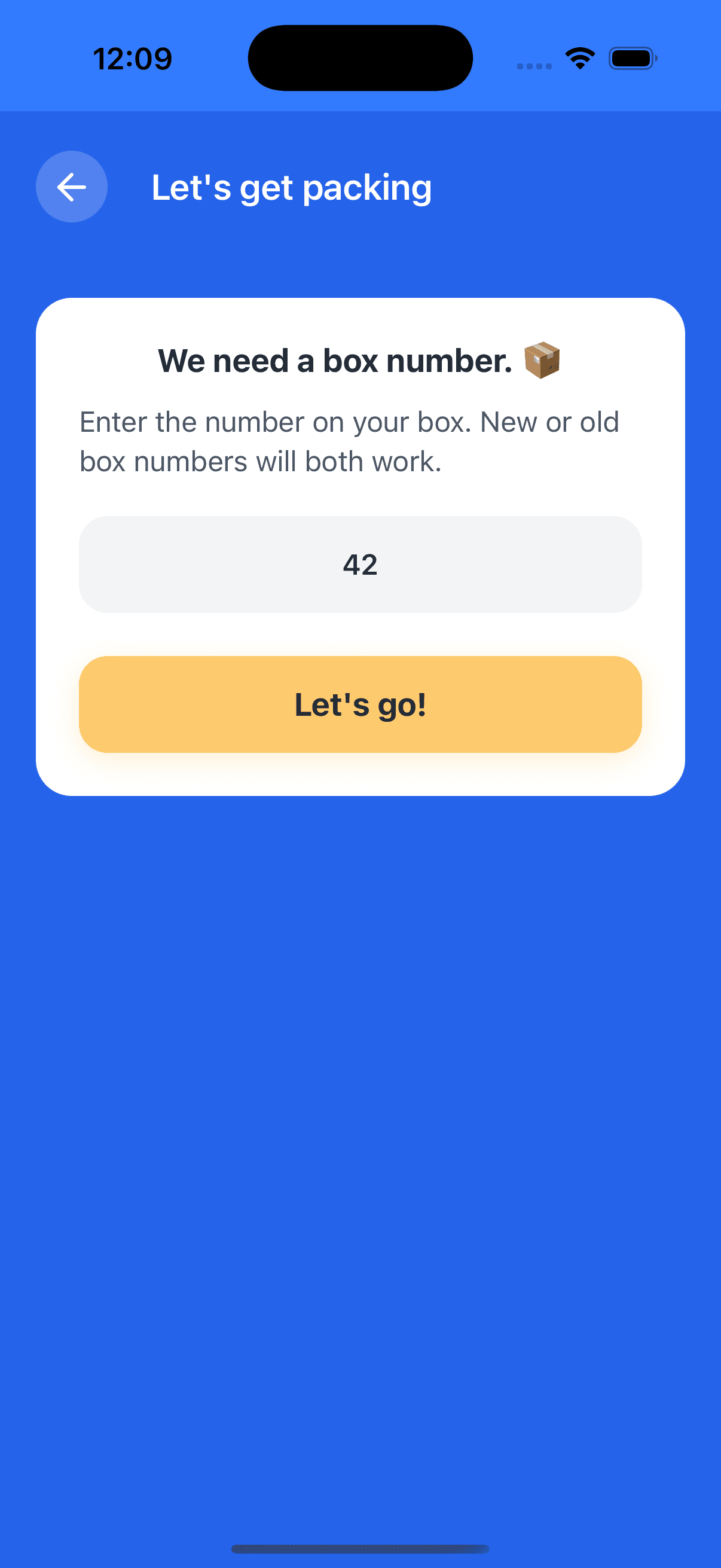
Start with the number
A marker is enough for the label.
Give each box its own number and write it on two sides. The number in Box’d matches the one you can see on the shelf.
Box’d’s number-entry screen. No printed label needed.
Record what’s inside
Say the list while you pack.
For a kitchen box, you might say “kettle, mugs, tea and phone chargers”. Check the list and add a photo before taping it shut.
Box’d’s voice-entry screen with example contents.
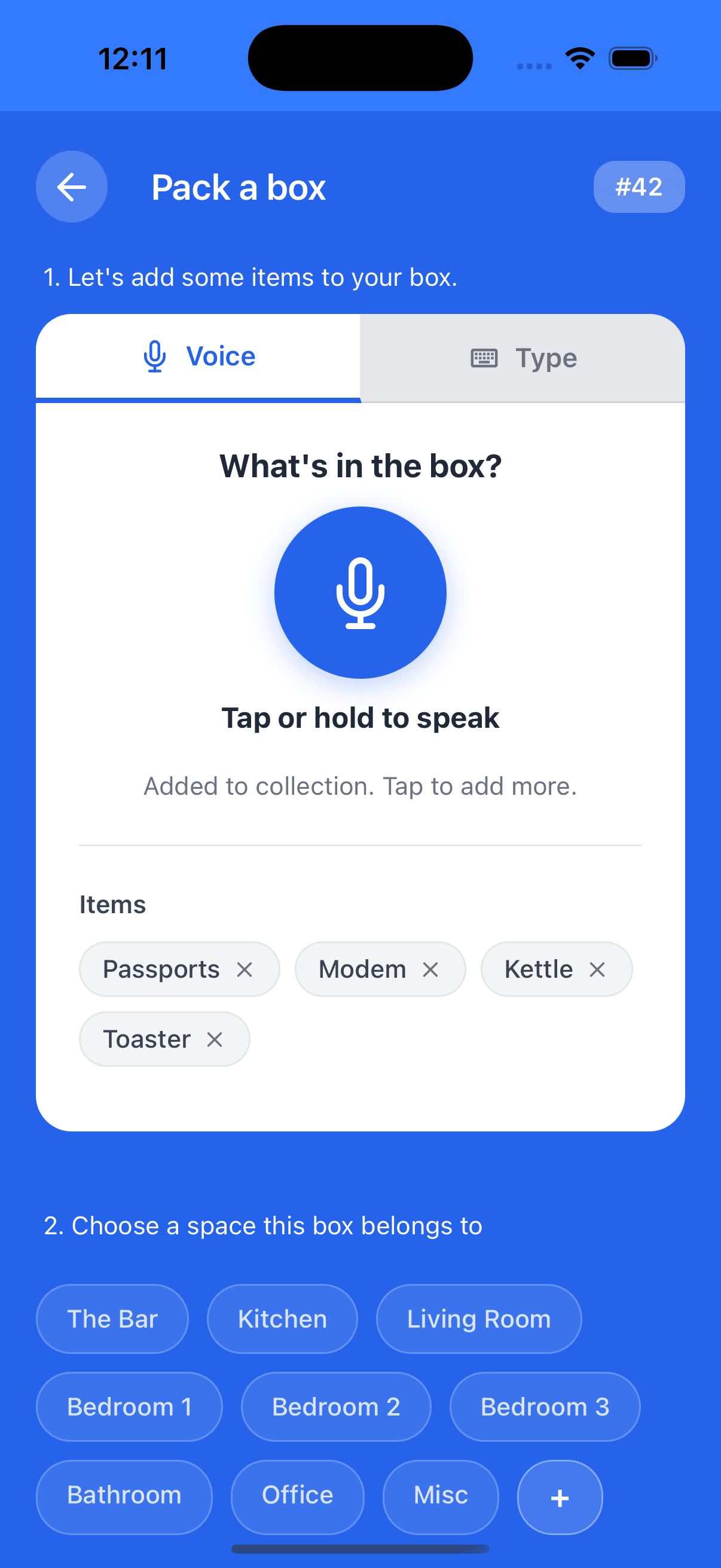
Later, search for “kettle” and read the matching box number. You don’t have to remember its room or scan a label. Keep essentials such as medication and travel documents with you during the move.
Partner Share lets someone else help pack and search your inventory using their own account. Every paid plan includes it, including the move pass. Only the inventory owner needs to pay; invited collaborators join free and can edit the shared inventory.
Choose optional Box’d QR labels if you want to scan boxes or use Flashlight Search. Flashlight Search highlights a matching QR-labelled box in the camera view. Handwritten numbers don’t enable that feature.
Box’d is iPhone-only and needs internet for search and sync. It’s a good fit when you want numbered boxes, voice entry and shared packing in one app. Try five boxes free without an account before choosing a plan.
See how Box’d works for a move and the current App Store listing.
Where the other apps fit
2. BoxBuddy: a QR-focused family packing workflow
BoxBuddy combines room-based numbering, photos, voice keywords and printable QR labels. Its Family plan lets invited members help without buying their own subscriptions. It needs an internet connection.
Its help describes adding boxes separately from printing labels, so we wouldn’t treat a printer as a confirmed requirement. Compare the setup with Box’d’s explicit handwritten-number workflow before deciding.
Sources: BoxBuddy US App Store, setup guide, FAQ and Family Sharing.
3. MOVINGBOXES: an option for Android and web access
MOVINGBOXES, by SCALAN, supports iOS, Android and a browser. Alongside contents and photos, it offers shared projects, voice commands and image recognition. Its labels can include or omit QR codes.
This is worth comparing if helpers use different devices. Premium and the one-time Pro Bundle are different purchases. The bundle unlocks fewer features; check the in-app comparison for current limits.
Sources: MOVINGBOXES US App Store, features and sharing and plan FAQ.
4. Boxes: detailed inventories you’ll keep after the move
Boxes, by StackTracks, supports custom numbering, photos, QR codes, barcodes and NFC tags. It also offers custom attributes, team roles and offline work that syncs when you reconnect.
Consider it for ongoing storage or a detailed collection. Its App Store lists several purchases, including lifetime options. Check the capacity and features of the exact purchase rather than assuming each unlock is equivalent.
Source: Boxes US App Store.
5. Moving Organizer: a low-cost box list
Moving Organizer, by SmartRF Solutions, records box descriptions, photos and locations. The free Lite version supports one move with ads; Pro removes ads and adds backups and exports.
The developer’s sharing instructions use Dropbox backup and restore. That’s a manual handoff of the list, not a live shared inventory. It can suit a move where one person maintains the records.
Sources: Lite US App Store, Pro US App Store, Android listing and developer instructions.
6. Sortly: business inventory beyond moving day
Sortly tracks items using photos, folders, custom fields and barcode or QR scanning. Paid plans add user licences and label creation. Consider it if you also need an inventory system for equipment or business stock.
Its free allowance counts unique items, so compare your record structure before comparing limits with box-based apps. Advanced offers $49 monthly billing, so three months cost $147. Its introductory annual offer charges $288 upfront, advertised as $24/month. The renewal rate differs.
Source: Sortly’s current pricing and feature comparison.
7. Google Sheets or Apple Notes: make your own box list
Both can hold text and photos, and both support shared editing. Give each box a number, then put its contents in a matching row or note. Search the list when you need something.
You maintain the structure yourself. Agree on numbering and where photos belong before several people start editing. Sheets needs setup for offline use; Notes collaboration requires iCloud accounts.
Sources: Google’s guides to images, sharing and offline access, plus Apple’s Notes guide. Our app versus spreadsheet comparison shows how the same box looks in each approach.
Try one box before committing to the whole move
Number a box, record a few items, then close the app. Open it again and search for an item without relying on the room name. If someone is helping, check that they can find and update the same record.
Test reception where you’ll pack and unpack. Box’d and BoxBuddy need internet; Boxes advertises offline use. Check the other apps’ current offline behaviour before relying on them in a basement or storage unit.
You don’t need to settle on printed labels before packing. Our guide to handwritten numbers versus QR labels explains what each method adds.
If your main goal is managing a home rather than packed boxes, HomeZada offers free home inventory and paid maintenance and finance tools. For this shortlist, we’ve focused on finding your belongings during a move.