Moving together6 min readBy Box’d
How to share a moving inventory with your partner
You pack the kitchen. They pack the bedroom. Both of you should be able to find the phone chargers without asking who packed them.
The short version
Choose one shared inventory, agree on box numbers and give each person a packing area. Record contents as you go. In Box’d, Partner Share lets an approved partner view and manage the account’s inventory for a time you choose.
In this guide
Two people can pack efficiently and still end up with two versions of where everything went. A shared inventory gives you one place to record the answer. It needs a few agreed habits as well as shared access.
Choose one place for the box records
Before you start, decide where the list will live. A shared note or spreadsheet can work. A box app can keep contents, photos and locations together. Both people need to be able to open the same records.
Avoid keeping one main list on your phone and a second copy on your partner’s. Even if they match this morning, they won’t match after someone moves the chargers into a different box.
Agree who owns the inventory and who needs access. Someone packing needs to change records. Someone carrying boxes may only need the destination room written outside. Give access according to the job and the options your chosen tool actually offers.
Divide the packing before handing out box numbers
Give each person a room or a clear group of things to pack. Then agree how you’ll assign numbers. One person can hand out each next number, or you can use separate ranges.
| Person | Packing area | Box numbers |
|---|---|---|
| Alex | Kitchen | 1–20 |
| Sam | Bedroom | 21–40 |
Gaps in the sequence are fine. Two different boxes numbered 12 are harder to deal with. If someone runs out of numbers, agree on the next unused range before continuing.
Use names the other person will recognise. “Desk monitor cables” is easier to find than “my black leads”. Add photos where words alone won’t distinguish similar items.
When you move an item between boxes, update both records. If you can, let one person finish editing a box before the other changes it. Shared access doesn’t replace agreeing on what just moved.
Set up Partner Share in Box’d
Partner Share lets you pack and find boxes together without sharing a login.
Both people need Box’d on iPhone and their own account. Only the person sharing their inventory needs a paid plan. Every paid plan includes Partner Share, and everyone joining can use a free account. Log in on both phones and set this up while you have an internet connection.
Check the scope before approving
The current Partner Share flow requests full account access. Your partner can view and manage every box, item and photo in that account. It isn’t limited to one room or a selection of boxes, and this flow doesn’t offer a read-only choice.
1. Show your access code
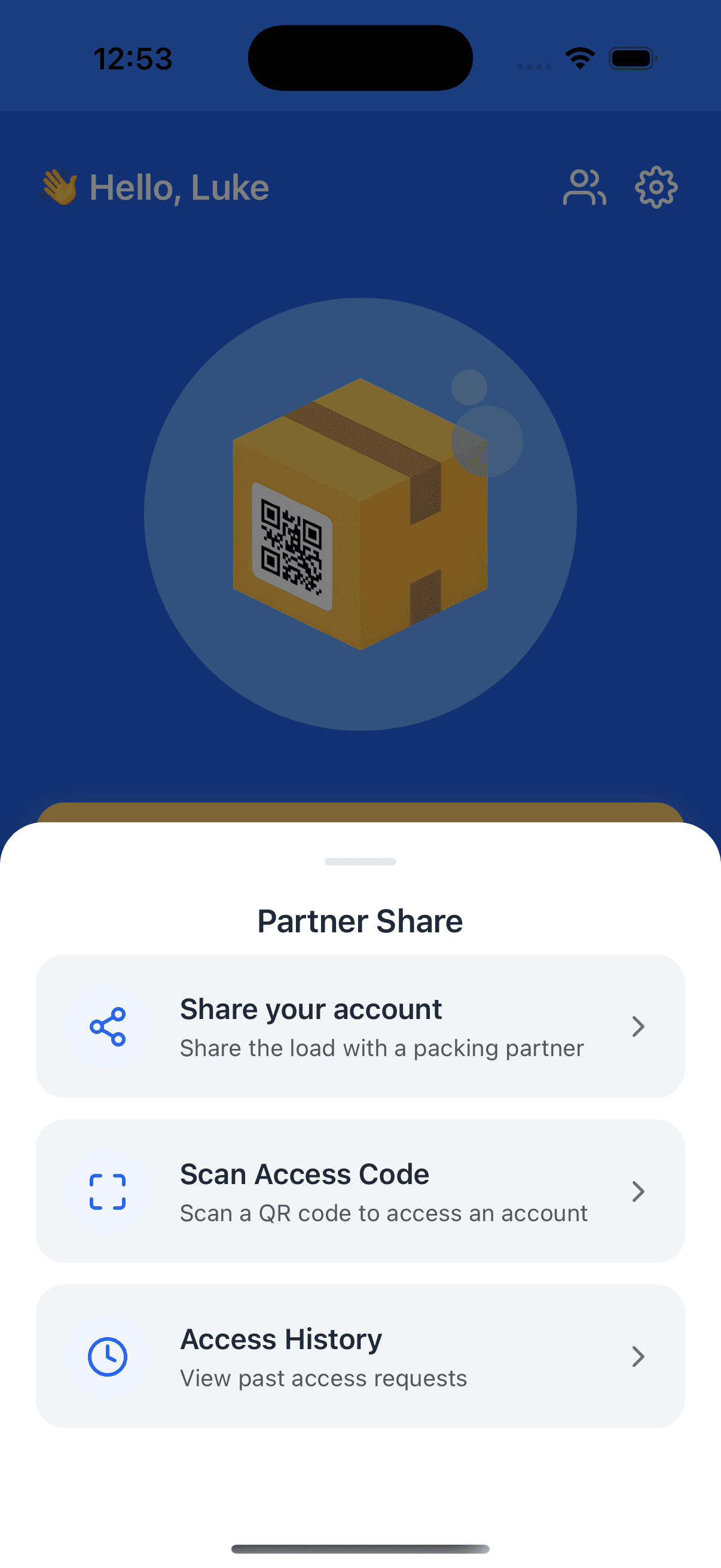
Open Partner Share and choose “Share your account”. Keep that screen open so your partner can scan the current code. The code refreshes automatically, so an old screenshot may no longer work.
A scan starts a request.
You approve the request before your partner can connect to your inventory.
Box’d’s Partner Share screen explains the full-access request above the code.
2. Have your partner request access
On their phone, open Partner Share and choose “Scan Access Code”. Scan the code on your screen and send the access request. Scanning alone doesn’t approve it.
3. Approve the person and duration
Review the request on your phone. You can reach requests through “Access History” in Partner Share. Confirm the person, choose an access duration and approve the full-access request.
The current duration options are 4 hours, 24 hours, 7 days and 30 days. Choose one that covers the work you’re doing together. Your partner can then tap “Connect now” on their phone.
This access code is for sharing the account. It’s different from a QR label attached to a box. You can use Partner Share while labelling all your boxes with handwritten numbers.
Check it works before packing separate rooms
Open the same box record on both phones. Have one person add an item, then check that the other sees it and can find the box by searching for that item. Confirm you’re in the shared inventory.
Try this with a box you’re actually packing. A useful test is whether your partner can find something you recorded without you explaining where you put it.
If a request fails, use the current code and check that both people are logged in. If access has expired, arrange fresh approval. Don’t keep packing into a separate list assuming it will appear in the shared inventory later.
Box’d needs internet for search and sync. Before moving day, take screenshots of essential box records if reception may be poor. Keep room names visible on the boxes for helpers who aren’t using the app.
Review access when the packing is done
The owner can revoke access through Partner Share’s “Access History”. Otherwise, the approved access ends when its duration expires. Review who still needs access once the move is over.
If you’ll keep sharing boxes in storage, agree who updates the inventory after each visit. Our storage box guide covers tracking items that leave and return months later.
You can try Box’d’s first 5 boxes free before choosing a paid plan for Partner Share. See Box’d for moving for the app, or our moving box guide for the packing system you can use together.